SiteRelay Free WordPress migration plugin
Move WordPress sites between servers.
Pull, push, back up and restore, with a restore point before every change. Try it below: it replays real jobs.
Version 1.0.0 is in review at WordPress.org.
This site staging
Live site on its host
Ready to pull the live site into this one.
- Tables
- 0 / 160
- Files
- 0 / 34,145
- Data
- 0 KB
- Real time
- 0:00
A real pull, replayed: a live business site, 160 tables and 34,145 files (2.7 GB), pulled from its host to a local copy in 34 minutes. Times vary: they depend on your hosting, the connection between the two sites and how much there is to copy.
- Free.
Pull, push, backups, multisite subsites and WP-CLI. No paid version, no size caps, no account.
- Direct.
Your two sites talk to each other. Nothing passes through a third-party service or the author’s servers, and every request is signed.
- Undoable.
A restore point before every change, and one click to undo it. Even a push, undone on the site it went to.
One pull, start to finish
Five screens between your staging site and a copy of live.
- 01
Connect the two sites
On the other site, choose what it accepts and create an access key. Paste its connection string here, and SiteRelay shows you exactly which site you’re talking to.

- 02
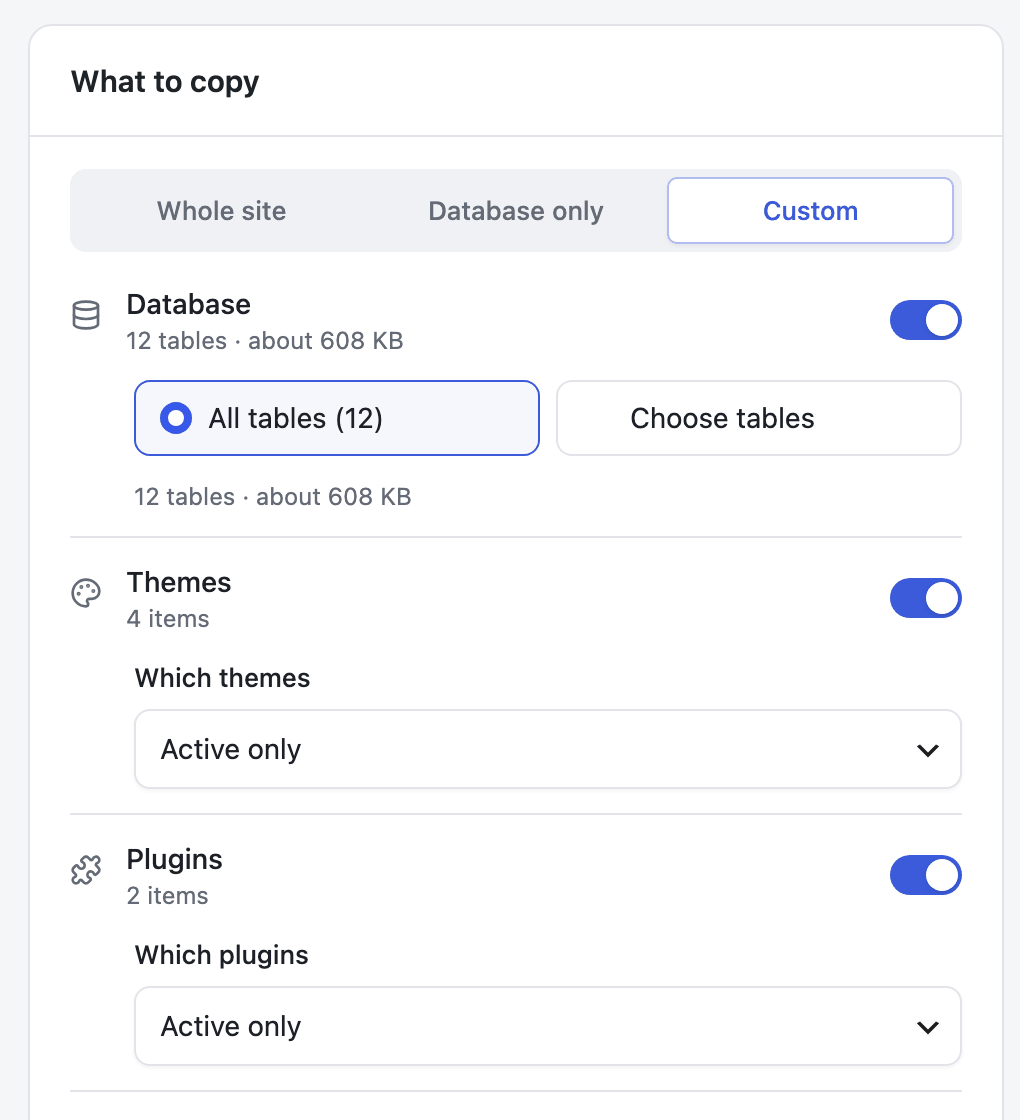
Choose what to copy
The whole site, just the database, or the parts you pick: themes, plugins, must-use plugins, uploads and the rest of wp-content, each with its own choice.
- 03
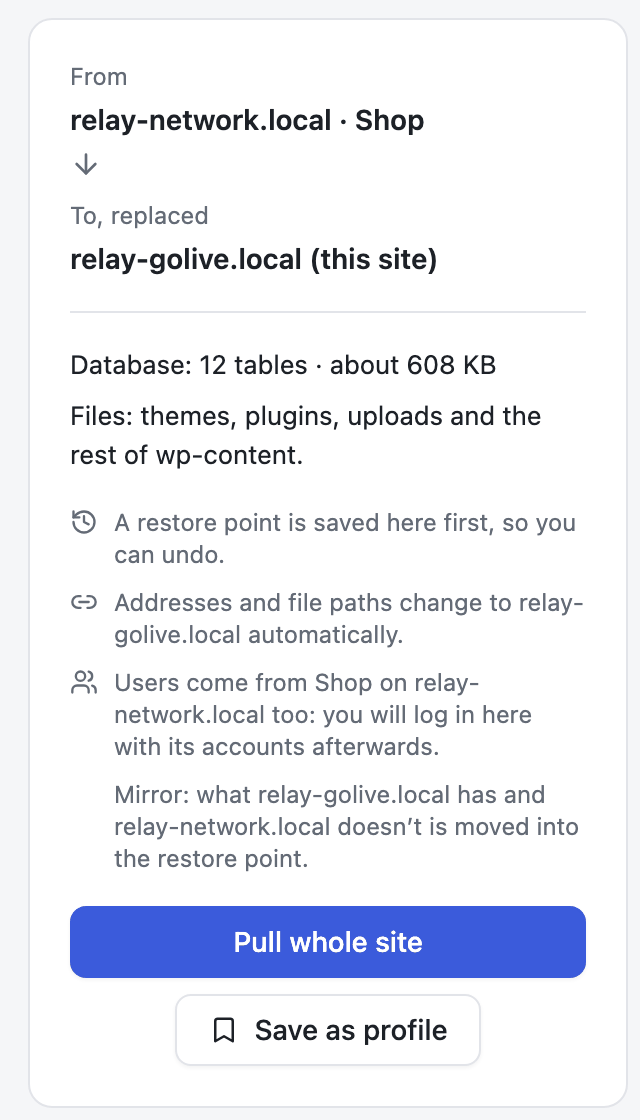
Read what will happen
Before anything moves, the summary says what is replaced, that a restore point is saved first, that addresses change automatically, and whose users you will have afterwards.
- 04
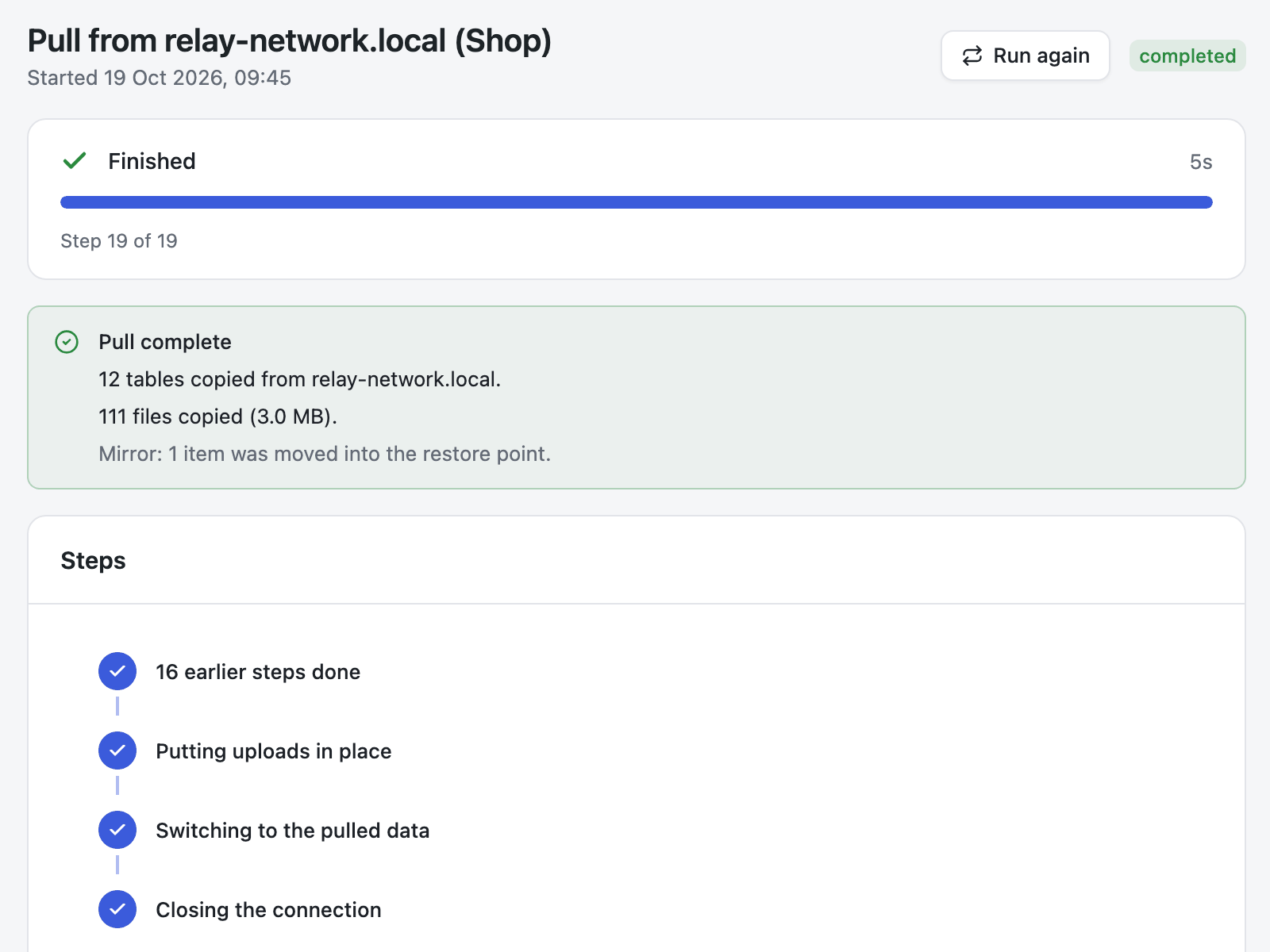
Let it run
Big sites move in small steps that hosting time limits don’t stop. When the copy is in, SiteRelay loads the site to check it still works, and puts everything back if it doesn’t.
- 05
Change your mind
Undo puts the tables back as they were before the job. The current ones are kept as a new restore point, so even the undo can be undone.

Find and replace
Every change, before it happens.
Change text or addresses across the whole database and see every change, before and after, before anything is written.
Serialized data keeps working: the length in front of a changed value is rewritten with it, where a plain search and replace would break it.
Try it: type in the preview. It runs in your browser on a small example database, with SiteRelay’s own rules. On a pull, push, import or restore, addresses change by themselves.
Find and replace, step by stepTry
wp_options · siteurl
- Before
http://staging.test- After
- https://www.example.com
wp_options · home
- Before
http://staging.test- After
- https://www.example.com
wp_options · widget_text, serialized
- Before
- s:
28:"http://staging.test/contact/" - After
- s:32:"https://www.example.com/contact/"
The number in front is the value’s length in bytes: 28 before, 32 after. SiteRelay rewrites it with the value, so the widget keeps working. A plain search and replace would leave 28 and break it.
wp_posts · post_content
- Before
- Our shop is open at
http://staging.test/shop/ - After
- Our shop is open at https://www.example.com/shop/
Left alone: wp_posts · guid. A post’s GUID is its permanent ID, not a link, so it only changes with Replace GUIDs on.
# On the live site: a key for one push, good for 24 hours
wp relay keys create --label="Go-live" --permission=push --expires=24h --one-time
# On staging: copy the live site down, whole
wp relay pull "relay1.…" --whole-site --yes
# See what a find and replace would change, without changing it
wp relay find-replace --find=http://old.test --replace=https://new.test --dry-run
# Changed your mind: undo a job from its restore point
wp relay jobs restore <id>
WP-CLI
Everything the screens do, from a terminal.
The same jobs, in History with their restore points, undoable from either place. For scripts, servers without a browser, and very large sites.
Every command and optionMeasured
- 2.7 GB
- a live business site, 160 tables and 34,145 files, pulled from its host to a local copy in 34 minutes; how long yours takes depends on your hosting
- 639
- automated tests on every change: PHP 7.4 to 8.4, WordPress 6.2 and latest, MariaDB and MySQL
- 0
- errors in WordPress.org’s Plugin Check, the tool the directory’s reviewers use
Security, designed in from the start
Built with security in mind and reviewed during development. No independent audit yet.
How security works- Every request between two sites is signed with the access key’s secret (HMAC-SHA256), carries a timestamp and a one-time nonce, and is refused if replayed. The answers are signed too.
- Secrets are stored encrypted (libsodium).
- Only the SQL statements SiteRelay itself writes are accepted from another site or a backup. Everything else is refused before it reaches the database.
- Its screens and API need an administrator.
Try to get a request past it
One site’s request to the other, signed for real in your browser with a demo key, the way SiteRelay signs. Change it on the way, hold it back or send it twice.
POST /wp-json/relay/v1/remote
- Change it on the way
- X-Relay-Key
- d3m0k7v2m9qx
- X-Relay-Job
- 8dae5a41-ba8e-4c9a-8c62-22057323100e
- X-Relay-Timestamp
- 1793112962 sent at 16:56:02
- X-Relay-Nonce
- 479a3fe71e19a7913670c2c7d3ea0a52
- X-Relay-Signature
- fe84040172203455b786e42b999eec91c5d1ebe285358a8664a263fedb41b927
Signed with the key’s secret (HMAC-SHA256): the op, the job, the key, the timestamp, the nonce and a hash of the body. The secret itself is never sent.
The receiving site checks
- The signature fits the request
- It was sent less than five minutes ago
- Its nonce has not been seen before
Nothing sent yet.
Server side, PHP 7.4 or later with no runtime dependencies. Screens in React (WordPress’ own copy) and TypeScript. Checked with PHPUnit, Vitest, PHPStan at level 6 and WordPress’ coding standards.
Everything it does
The whole list.
Pull and push
- Pull another site into this one, or push this site to another. The two talk to each other directly.
- Copy the whole site, just the database, or the parts you choose: themes, plugins, must-use plugins, uploads and the rest of wp-content.
- Addresses and file paths change automatically, including inside serialized data and JSON.
- Mirror makes the receiving site match exactly, with what it had moved into the restore point.
Backups, export and import
- Full backups of the database and files: keep them, download them, or restore one on another site.
- Export the database as .sql or .sql.gz, with find and replace on the file only if you want.
- Import a .sql or .sql.gz from SiteRelay, mysqldump or phpMyAdmin, or a SiteRelay backup .zip.
- Large files upload in pieces and resume after a dropped connection.
Find and replace
- Change text or URLs across the database, with a preview of every change first.
- Serialized and JSON data stay intact.
- Several pairs per run, with regular expressions and match case per pair.
A way back
- Every pull, push, import, restore and find & replace saves a restore point first.
- A push is undone on the site it went to, from the site that sent it.
- After a pull, push, import or restore, SiteRelay loads the site, and puts everything back if it no longer loads.
Multisite
- On a network, SiteRelay works on one subsite at a time: export, import, back up, find & replace, pull and push it.
- A site coming into a network becomes a subsite, existing or new.
- Its users join the network, merged by email, and you see who joins before anything runs.
Everyday comforts
- History of every job with its result, and a downloadable report.
- Saved profiles and Run again.
- Email and webhook notifications when a job finishes or fails, or another site pulls or pushes. Slack incoming webhooks work.
- WP-CLI for everything:
wp relay pull,push,export,importand more.
Before you install
The small print, in large print.
It needs
- WordPress 6.2 or later and PHP 7.4 or later (tested up to WordPress 7.1).
- SiteRelay on both sites to pull or push. To restore a backup elsewhere, only the receiving site needs it.
- An administrator account.
It doesn’t
- Move a whole multisite network in one go. It moves one subsite at a time.
- Copy must-use plugins or the rest of wp-content into a network, which every subsite shares.
- Ship translations yet. They will come through translate.wordpress.org; the template is included.
Proven so far
- A pull from a live host to a local copy: proven, on the site above.
- Pushes, backups and restores: tested between local sites and in the automated tests. A push to real hosting has not been tried yet.
- Security: designed in from the start and reviewed during development. No independent audit yet.
The handbook
Nine guides, then the full reference.
Plain words, numbered steps and real screens from SiteRelay 1.0.0.
Questions
What people ask first.
The rest is in Troubleshooting, which explains every message SiteRelay shows.
Is it really free?
Yes. SiteRelay is free software under the GPL: no paid version, no licence key, no account and no size caps. Pull, push, backups, multisite subsites and WP-CLI are all in the one plugin.
Does SiteRelay have to be on both sites?
To pull or push, yes. To restore a backup on another site, only that site needs SiteRelay: download the backup here and upload it there.
Can I undo a migration?
Yes. SiteRelay saves a restore point before it changes anything, and History offers to undo the job. It keeps the newest restore points, two by default, and you can change that in Settings.
Is my data sent anywhere else?
Not your site’s data. The two sites talk to each other directly, and notifications go only to the email addresses or webhook you set. SiteRelay uses no service of its own and never sends data about your site to its author.
Why do I have to log in again after a pull or a restore?
When the users were copied too, the site now has the other site’s accounts: log in with one of those. SiteRelay takes you to the login page and brings you back to the job.
Coming from Relay 0.9.x?
SiteRelay is Relay’s new name, from version 1.0.0: the same plugin, in the WordPress.org directory, renamed because another plugin there is already called Relay.
Deactivate Relay, then install and activate SiteRelay. Your settings, access keys, saved connections, History and backups carry over.
Move your next site with a way back.
Version 1.0.0 is in review at WordPress.org.
Also by Usama Gierdien: Seamless, a WordPress caching plugin.